Tab Tools: Export and Manage Your Tabs
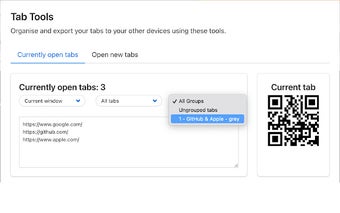
Tab Tools is a revolutionary Google Chrome / Microsoft Edge extension that aims to enhance your browsing experience. With this extension, you can effortlessly export your current tab using a dynamic QR code and even import and export a list of URLs from all your active tabs.
The export and share feature allows you to generate QR codes instantly for your active tab and export lists of URLs from all your tabs. You can also refine your list with filters such as window, pinned, and tab group.
Seamless importing is made possible with Tab Tools. You can reload your tabs effortlessly and organize them in your preferred order with a simple click. You have the flexibility to load your tabs in the current window or launch a new one.
For advanced importing options, you can extract URLs seamlessly from any text. You also have the option for delayed loading (lazy load) to optimize browser performance. Tab Tools provides versatile loading options, including random or reverse order and the preference for current or new windows.
Tab Tools offers several benefits to enhance your browsing experience. It allows for quick transfer of tabs between devices or sharing them with peers, helping you improve efficiency. The filtering options and tab group management features help you better organize your tabs. Customizable loading preferences provide flexibility to suit your browsing style. Additionally, the lazy load feature optimizes your browser's performance.
Don't wait any longer to enhance your browsing experience. Install Tab Tools to your Google Chrome / Microsoft Edge and unlock a seamless, organized, and efficient browsing journey.